

Hypercore
Reference information about the TimescaleDB hybrid row-columnar storage engine
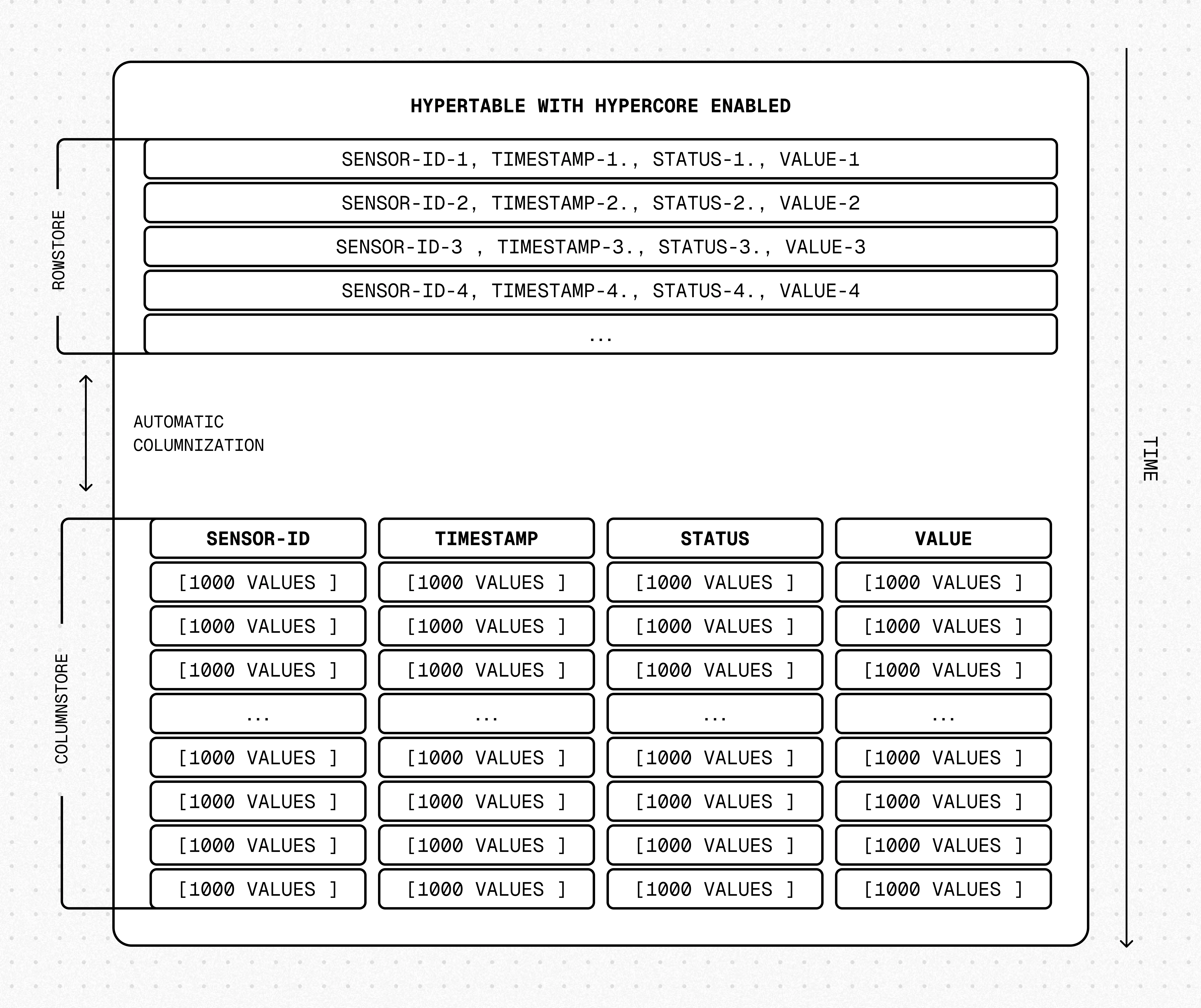
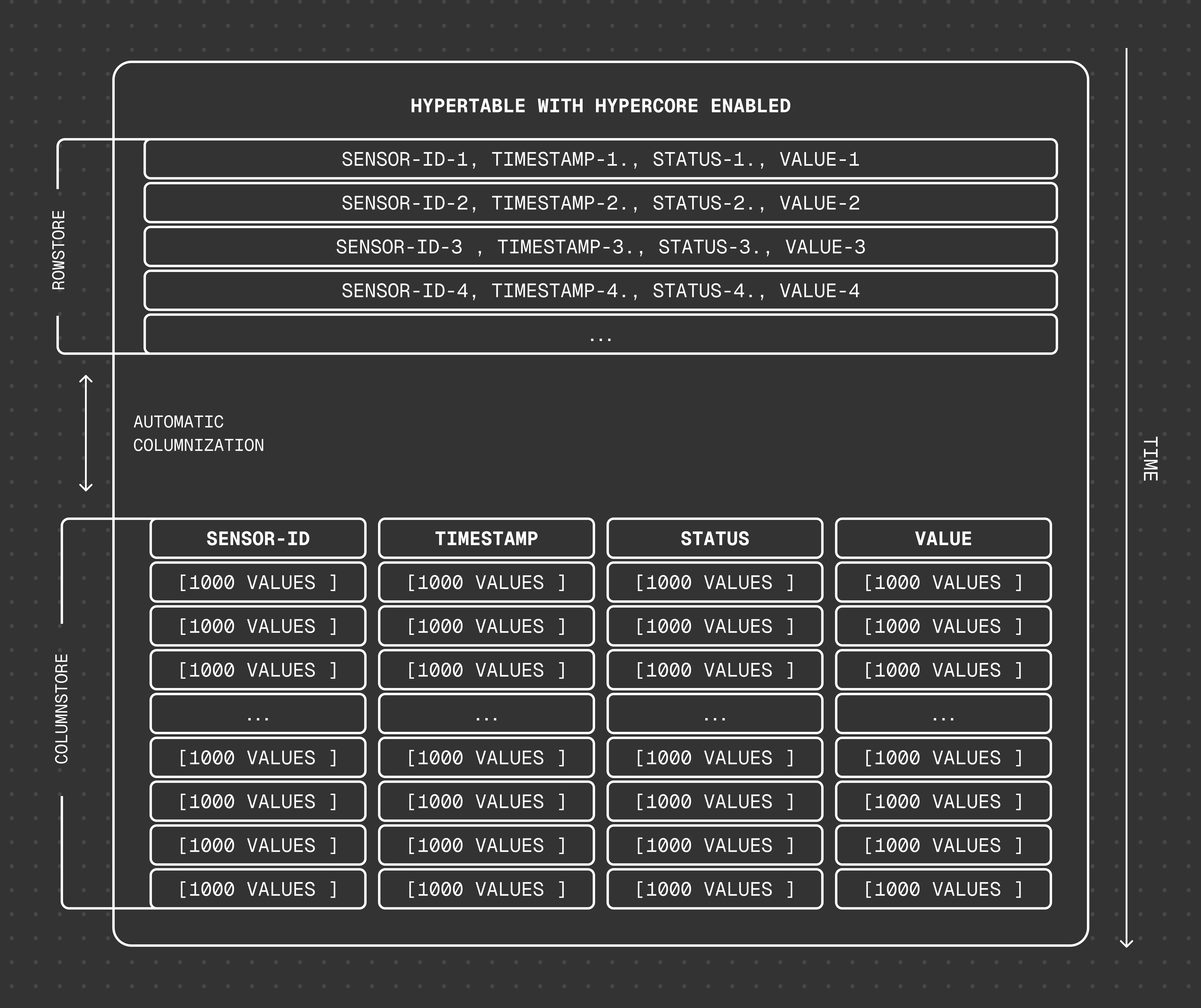
Hypercore is a hybrid row-columnar storage engine in TimescaleDB. It is designed specifically for real-time analytics and powered by time-series data. The advantage of hypercore is its ability to seamlessly switch between row-oriented and column-oriented storage, delivering the best of both worlds:
Hypercore solves the key challenges in real-time analytics:
- High ingest throughput
- Low-latency ingestion
- Fast query performance
- Efficient handling of data updates and late-arriving data
- Streamlined data management
Hypercore‘s hybrid approach combines the benefits of row-oriented and column-oriented formats:
-
Fast ingest with rowstore: new data is initially written to the rowstore, which is optimized for high-speed inserts and updates. Real-time applications can handle rapid streams of incoming data, including upserts and late-arriving rows.
-
Efficient analytics with columnstore: as the data cools, TimescaleDB automatically converts it to the columnstore. The columnar format enables fast scanning and aggregation. Multiple mechanisms keep queries fast:
- Chunk skipping skips entire chunks that cannot match the query.
- Vectorized execution evaluates aggregate functions directly on columnstore batches. Since 2.27.0, this path also covers queries whose
WHEREclause uses non-vectorizable functions liketime_bucket(), including continuous aggregate refreshes — yielding 30%–2× faster execution in many cases. - Sparse indexes —
bloomfor equality andminmaxfor ranges — let the engine skip individual batches without decompressing them. Bloom indexes accelerateSELECT,UPDATE,DELETE, andUPSERToperations on compressed data. - Summary queries like
COUNT,MIN,MAX,FIRST, andLASTread results straight from batch metadata.
-
Lower storage costs: 90–98% compression in the columnstore reduces storage cost dramatically, without sacrificing query performance.
-
Fast modification of compressed data in columnstore: just use SQL. TimescaleDB supports
INSERT,UPDATE,DELETE, andUPSERTdirectly on the columnstore, with high-performance paths for each. -
Full mutability with transactional semantics: regardless of where data is stored, hypercore provides full ACID support. Like in a vanilla PostgreSQL database, inserts and updates to the rowstore and columnstore are always consistent and visible to queries as soon as they complete.
For an in-depth explanation of how hypertables and hypercore work, see the Data model.
Samples
Section titled “Samples”Convert automatically with a columnstore policy
A columnstore policy runs as a background job and converts eligible chunks to the columnstore on a schedule. This is the best path for most workloads.
- Connect to your Tiger Cloud service
In Tiger Console open an SQL editor. You can also connect to your service using psql.
- Enable the columnstore and add a policy
For efficient queries,
segmentbythe column you filter on most often, andorderbyyour time column. How you enable hypercore depends on what you start from:-
New hypertable
Use
CREATE TABLEto create a hypertable with hypercore enabled by default:CREATE TABLE crypto_ticks ("time" TIMESTAMPTZ,symbol TEXT,price DOUBLE PRECISION,day_volume NUMERIC) WITH (timescaledb.hypertable,timescaledb.segmentby='symbol',timescaledb.orderby='time DESC');When you create a hypertable using CREATE TABLE … WITH …, the default partitioning column is automatically the first column with a timestamp data type. Also, TimescaleDB creates a columnstore policy that automatically converts your data to the columnstore, after an interval equal to the value of the chunk_interval, defined through
afterin the policy. This columnar format enables fast scanning and aggregation, optimizing performance for analytical workloads while also saving significant storage space. In the columnstore conversion, hypertable chunks are compressed by up to 98%, and organized for efficient, large-scale queries.You can customize this policy later using alter_job. However, to change
afterorcreated_before, the compression settings, or the hypertable the policy is acting on, you must remove the columnstore policy and add a new one.You can also manually convert chunks in a hypertable to the columnstore.
-
Existing hypertable
Enable the columnstore on a hypertable that already holds data in the rowstore:
ALTER TABLE crypto_ticks SET (timescaledb.enable_columnstore,timescaledb.segmentby = 'symbol',timescaledb.orderby = 'time DESC');These settings apply to chunks that have not yet been converted to the columnstore. For a hypertable that has never used hypercore, that means every chunk. Then add a policy:
CALL add_columnstore_policy('crypto_ticks', after => INTERVAL '7d');The job runs single-threaded, so for a large backlog the initial conversion can take a while to catch up. To convert a backlog faster, convert chunks manually.
-
Existing continuous aggregate
A continuous aggregate is a specialized hypertable. Use
ALTER MATERIALIZED VIEW:ALTER MATERIALIZED VIEW assets_candlestick_daily set (timescaledb.enable_columnstore = true,timescaledb.segmentby = 'symbol');The continuous aggregate must already have a refresh policy before you add a columnstore policy. Then add the policy:
CALL add_columnstore_policy('assets_candlestick_daily', after => INTERVAL '1d');
TimescaleDB is optimized for fast updates on compressed data in the columnstore. To modify data in the columnstore, use standard SQL.
-
- Check the columnstore policy
When you convert data to the columnstore, as well as being optimized for analytics, it is compressed by more than 90%. This helps you save on storage costs and keeps your queries operating at lightning speed. To see the amount of space saved:
SELECTpg_size_pretty(before_compression_total_bytes) as before,pg_size_pretty(after_compression_total_bytes) as afterFROM hypertable_columnstore_stats('crypto_ticks');You see something like:
before after 194 MB 24 MB View the policies that you set or that already exist:
SELECT * FROM timescaledb_information.jobsWHERE proc_name='policy_compression'; - Remove a policy or disable the columnstore
To remove a columnstore policy while keeping existing chunks in the columnstore:
CALL remove_columnstore_policy('crypto_ticks');See remove_columnstore_policy. To disable the columnstore entirely, first convert the chunks back to the rowstore, then:
ALTER TABLE crypto_ticks SET (timescaledb.enable_columnstore = false);
Convert chunks manually
Call convert_to_columnstore on individual chunks when you want finer control than a policy gives you — for example, to convert a large backlog faster than the single-threaded policy job can. The columnstore settings that you set with ALTER TABLE still apply.
- List the chunks to convertSELECT show_chunks('crypto_ticks', older_than => INTERVAL '7d');
- Convert the chunks
Chunks are converted independently, so you can run
convert_to_columnstoreon distinct chunks from multiple sessions in parallel:-- Session 1CALL convert_to_columnstore('_timescaledb_internal._hyper_1_2_chunk');-- Session 2 (concurrent)CALL convert_to_columnstore('_timescaledb_internal._hyper_1_3_chunk');Each call takes an exclusive lock on the chunk it is converting. Different chunks do not block each other, so parallel sessions speed up an initial migration. Match the degree of parallelism to your service’s available CPU and I/O.
Backfill while converting
This applies whether you convert with a policy or manually. Conversion contends on locks with any concurrent write to the same chunk. If you backfill old data while a columnstore policy or a manual convert_to_columnstore call is running, the two operations wait on each other and one can fail or stall. For a clean migration:
- Pause the columnstore policy
Find the
job_id:SELECT job_id FROM timescaledb_information.jobsWHERE proc_name = 'policy_compression' AND hypertable_name = 'crypto_ticks';Then pause the policy:
SELECT alter_job(<JOB_ID>, scheduled => false); - Backfill your data
Run your backfill while the policy is paused, so it does not contend with conversion for locks.
- Convert the affected chunks
Convert the chunks you backfilled into the columnstore. See Convert chunks manually.
- Re-enable the policySELECT alter_job(<JOB_ID>, scheduled => true);
For the full pause-backfill-reconvert workflow, see convert_to_rowstore.
Limitations
Section titled “Limitations”chunks in the columnstore have the following limitations:
ROW LEVEL SECURITYis not supported on chunks in the columnstore.
Available functions
Section titled “Available functions”Policies
Section titled “Policies”add_columnstore_policy(): set a policy to automatically move chunks in a hypertable to the columnstore when they reach a given ageremove_columnstore_policy(): remove a columnstore policy from a hypertable
Configuration
Section titled “Configuration”ALTER TABLE (hypercore): enable the columnstore for a hypertable
Manual conversion
Section titled “Manual conversion”convert_to_columnstore(): manually add a chunk to the columnstoreconvert_to_rowstore(): move a chunk from the columnstore to the rowstore
Statistics and information
Section titled “Statistics and information”chunk_columnstore_stats(): get statistics about chunks in the columnstorehypertable_columnstore_stats(): get columnstore statistics related to the
timescaledb_information.chunk_columnstore_settings: get information about settings on each chunk in the columnstoretimescaledb_information.hypertable_columnstore_settings: get information about columnstore settings for all hypertables